TL;DR
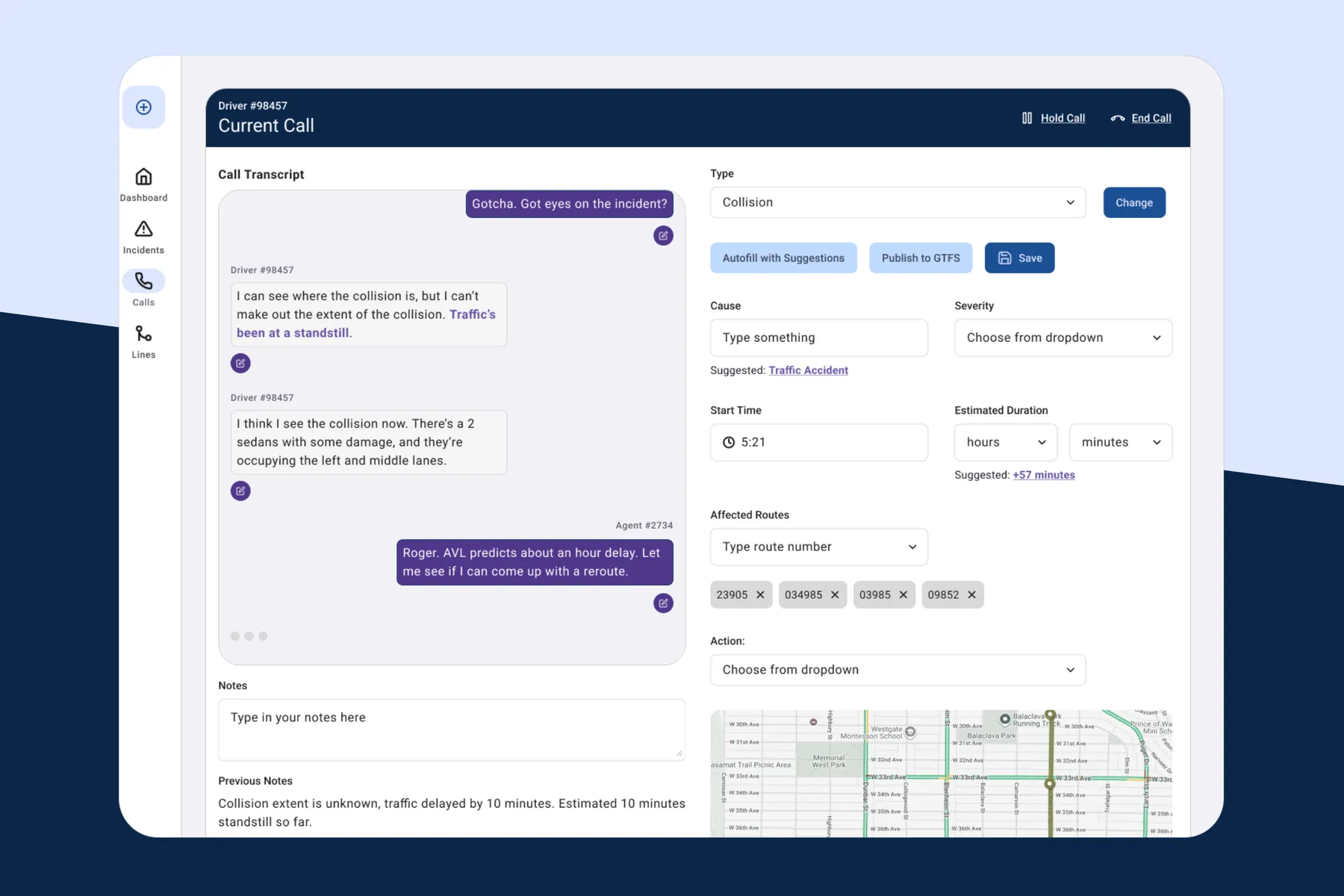
This is a self-started project undertaken to study the transit system, identify potential UX issues, and solve for them. Because I am working off of only publicly-available information and data, there is a lot of guesswork. In the end I designed a AI-powered transit service authoring tool that would allow transit agencies to efficiently communicate line disruptions.
Project overview
This project started as an exercise in demonstrating something specific: that I can design operational software that utilizies a complex, real-time data model. I enjoyed working on Staples's ATC tool- simplifying complex information for those who need it for everyday work, so I wanted to do a project that allowed me to do more of that.
Transit agencies work with real-time data, and Translink, Metro Vancouver's transit agency, provides free, well-documented and accessible data via their API, so that's the rabbit hole I chose to go down.
The starting question came from a little look into online forums about Translink and the Metro Vancouver transit. I found that people were using some combination of the Translink alert tool, the Transit app and Google maps to find accurate information about their next bus or information about their route.
If all of them have access to the API that provides the same real-time data, then what is causing these different agencies to have different sources of information and where in the process (at Translink) does it break down?
Initial Research: how disruptions actually get communicated
I should start by saying that I was not hired by Translink, and that this is a self-started and initiated project. Because I have no access or insight into Translink's process, organizational structure or the kinds of program that they use, all of the mockups I've created are based on what I was able to find online and a looot of assumptions and best guesses.
I started by trying to understand TransLink's internal workflow before designing anything. A few of the sources I found described this directly:
- Bus operators are the frontline sensors. They radio dispatch when something happens, and their vehicles are already tracked automatically through an Automatic Vehicle Location system.
- Dispatch runs through Coast Mountain Bus Company's Transit Communications Centre (T-Comm), a centralized control function running on a system called TMAC, introduced in 2008, coordinating the fleet in real time.
- A separate Customer Information team, including a specific "X Desk" function, publishes rider-facing alerts, with individual staff signing posts with their initials - a strong hint that these are manually authored by X desk, not automated.
- TransLink also partners with the Transit app, which layers its own automated detour detection and crowdsourced rider GPS on top of TransLink's official data, notably for SkyTrain, which doesn't have an official real-time feed at all. I found this documented directly in Transit's own blog post about the partnership, which also mentions that Transit's systems detect upwards of 200 bus detours a month independently of what TransLink staff report, and that TransLink actually consumes that detection data back.
Now to take a look and figure out the data sources for Translink, Google Maps and Transit.
Getting hands-on with the actual data
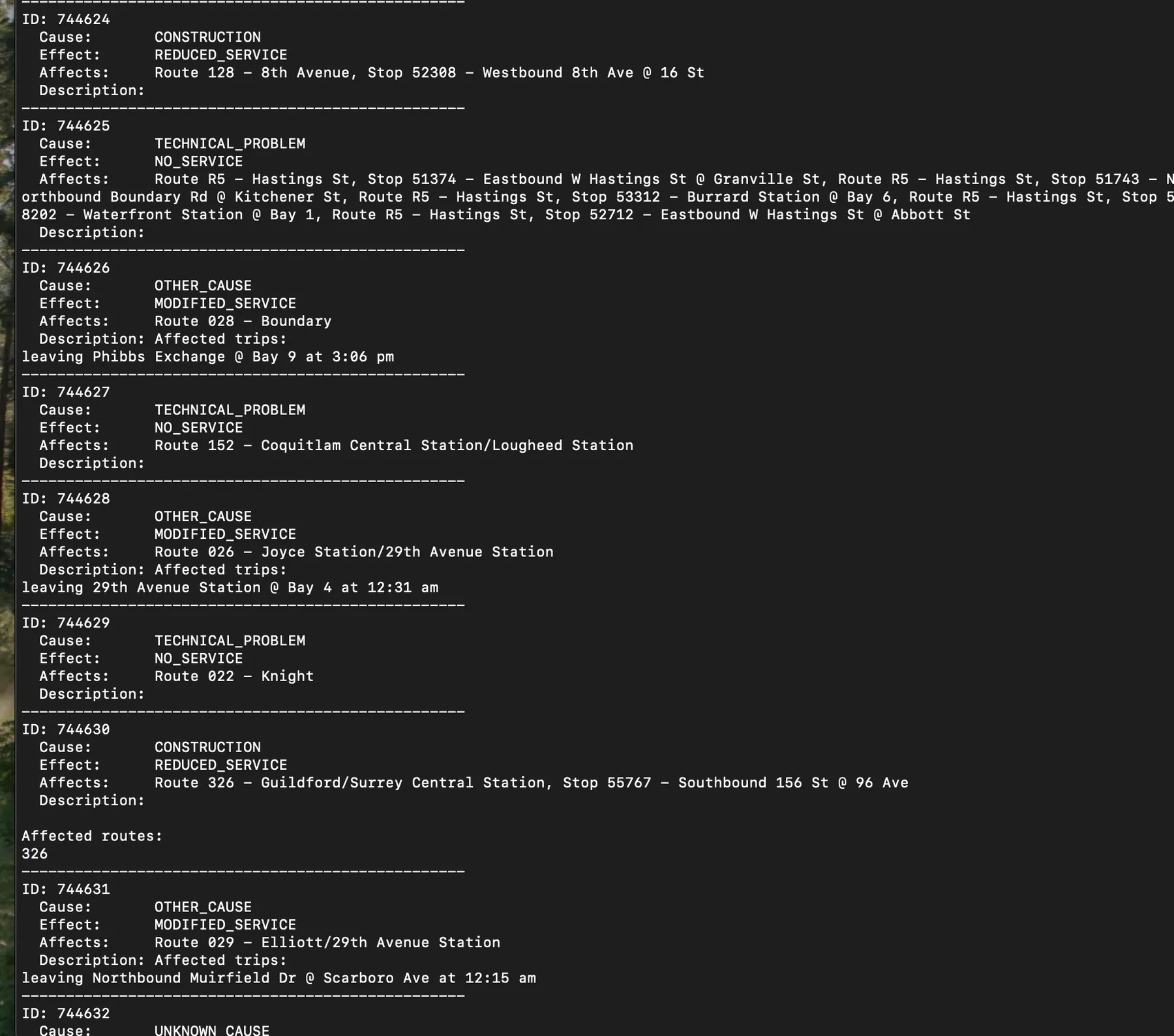
I didn't want to design this from secondhand research alone, so I registered for TransLink's Open API and worked through actually pulling live data from their GTFS-realtime feed (with a lot of help from Claude). This gave me great insight into what actual information comes out of the GTFS static and realtime feeds, what structured data it provide. I could also compare this info to feeds that came from Transit, Google and Translink's alerts tool.
Once I had real alerts printing, I could see the actual GTFS-realtime spec fields in use - cause, effect, and a severity_level field I hadn't initially been designing around, which turns out to be a judgment call left to whoever authors the alert rather than something computed automatically.
Comparing TransLink's Alerts, Transit, and Google Maps
Now for a look at TransLink's Alert tool, Transit, and Google Maps.
I wanted to actually put the hypothesis from the forums to the test rather than just trust what people were saying online, so I spent some time cross-referencing TransLink's own alerts page against Google Maps and the Transit app for the same routes. All three appeared to be pulling from the same underlying GTFS data, but Transit consistently surfaced disruption information faster, in the handful of instances I checked, than TransLink's own alerts page did.
I think this comes down to how Transit sources its information. It doesn't rely solely on TransLink's official structured incident feed, it also layers in crowdsourced rider location reports through their "GO" feature, which lets it infer something's wrong before T-Comm has even confirmed and published an official cause. Google Maps, from what I could tell, relies only on TransLink's official GTFS-realtime feed, with no additional crowdsourcing layered on top. From what gathered in the forums, people just seem to turn to Google Maps more for general route planning for ease of use or maybe just habit, but Transit or Translink alert tool as more reliable in the moment when something was actively going wrong.
This comparison is what actually guided me towards the right direction for my project. Transit's advantage comes from rider-side crowdsourcing whichI have no way to build against, and honestly, replicating it didn't appeal to me nearly as much as what I set out to do- the human process sitting behind TransLink's official channel. However good rider crowdsourcing gets, TransLink will always need its own fast, accurate, human-verified alert, and that channel is (and here's the biggest assumption from my end so far) bottlenecked by how quickly T-Comm can turn a driver's phone call into something Customer Information/X Desk can actually publish. So I decided to narrow the project specifically to a tool sitting between T-Comm and Customer Information/X Desk, using AI-assisted suggestions to shrink that gap, rather than trying to compete with or replicate what Transit is doing on the rider-crowdsourcing side.
A closer look at TransLink's own website
While comparing the API output against what's shown publicly, I checked the source code of translink.ca/alerts directly, and found that the page's own JavaScript imports modules named things like GTFSRealtimeHelper, GTFSStaticFileHelper, and TransitAlerts. That's seemed to strongly indicate that TransLink's website is built around the same GTFS data model as the public API, even though it fetches from a separate internal endpoint (getaway.translink.ca) rather than the public one.
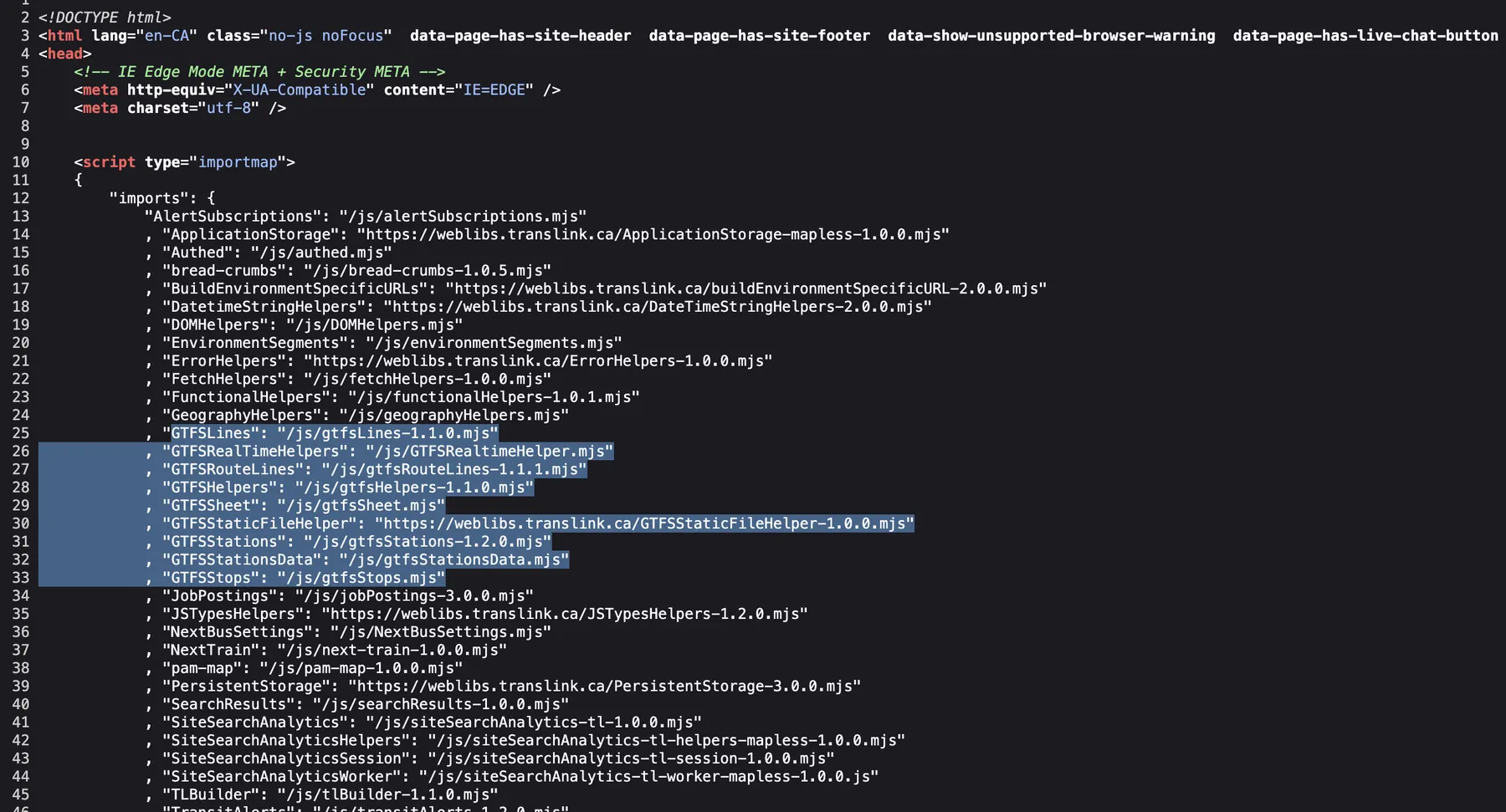
That finding actually walked back an assumption I'd been building the project around. I'd assumed the different public channels (website, X, GTFS-realtime feed) were three disconnected pipelines with three separately authored versions of the truth. The website's own code suggests there's likely one canonical, GTFS-shaped alert record underneath at least the website and the public API. What I still don't know and have no way of knowing without internal access to Translink's system, is how that record gets created: whether it's populated automatically the moment a dispatch action is logged, or typed manually by a person after a phone call. Given that X Desk posts are individually signed, I'd guess it's closer to the latter, but that's an assumption to state plainly, not a confirmed fact.
One thing that supports the "manual authoring, not automatic" theory: I noticed that TransLink's public alerts page typically lags 15-30 minutes behind when an incident actually happens. Automated caching delays tend to be measured in seconds; a consistent 15-30 minute window is far more likely a result of a human being writing, checking, then publishing a change in status before it goes live.
Understanding what dispatch actually does
Before designing the tool itself, I needed to understand what dispatch is actually responding to and doing when an incident happens. For that I needed data, and references.
I first used Claude to give me an idea of what information drivers, T-comm and Customer data *receives*and what data they *provide*to each other.
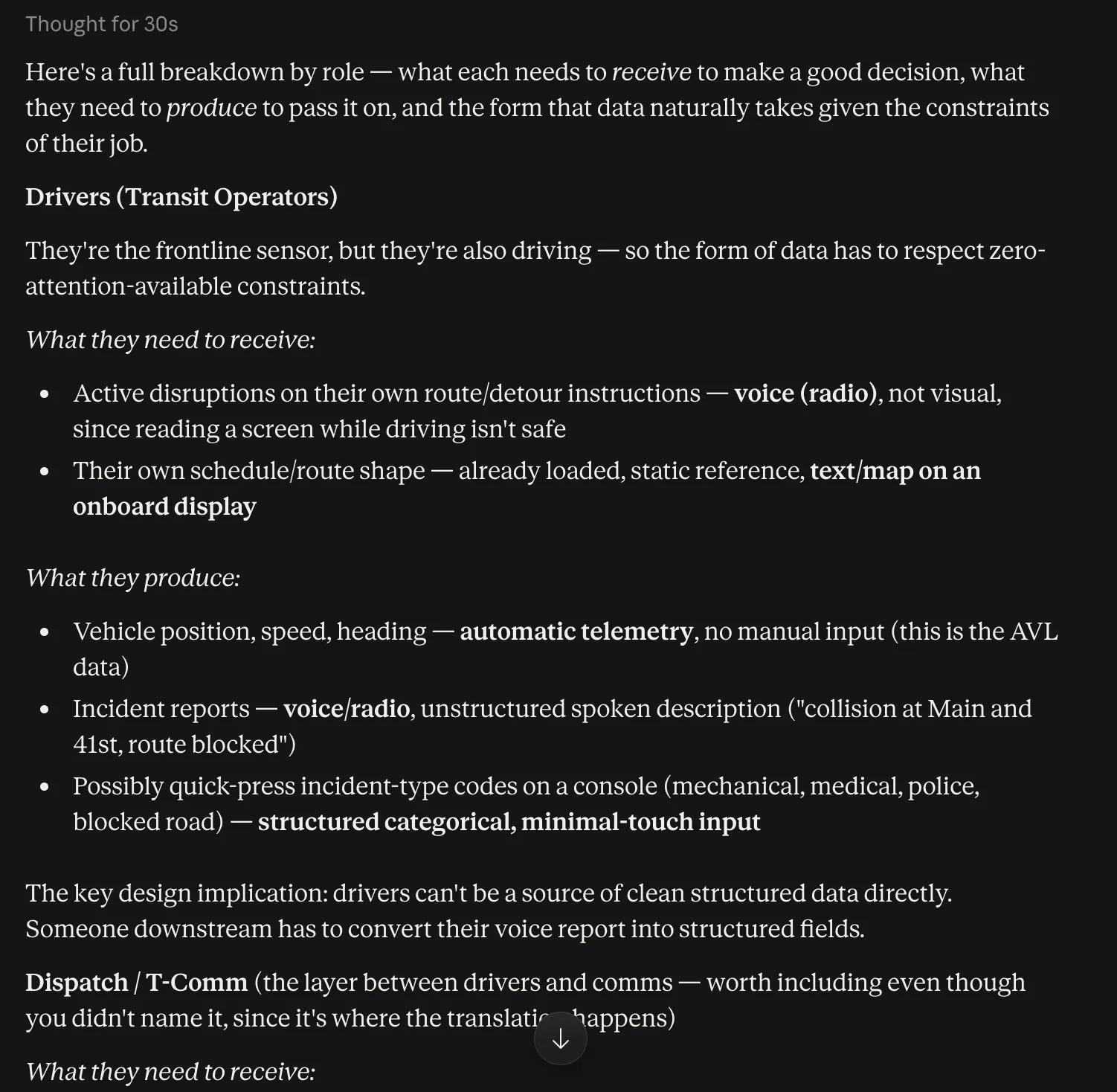
and asked how much of that information needs to be inputted into the system:
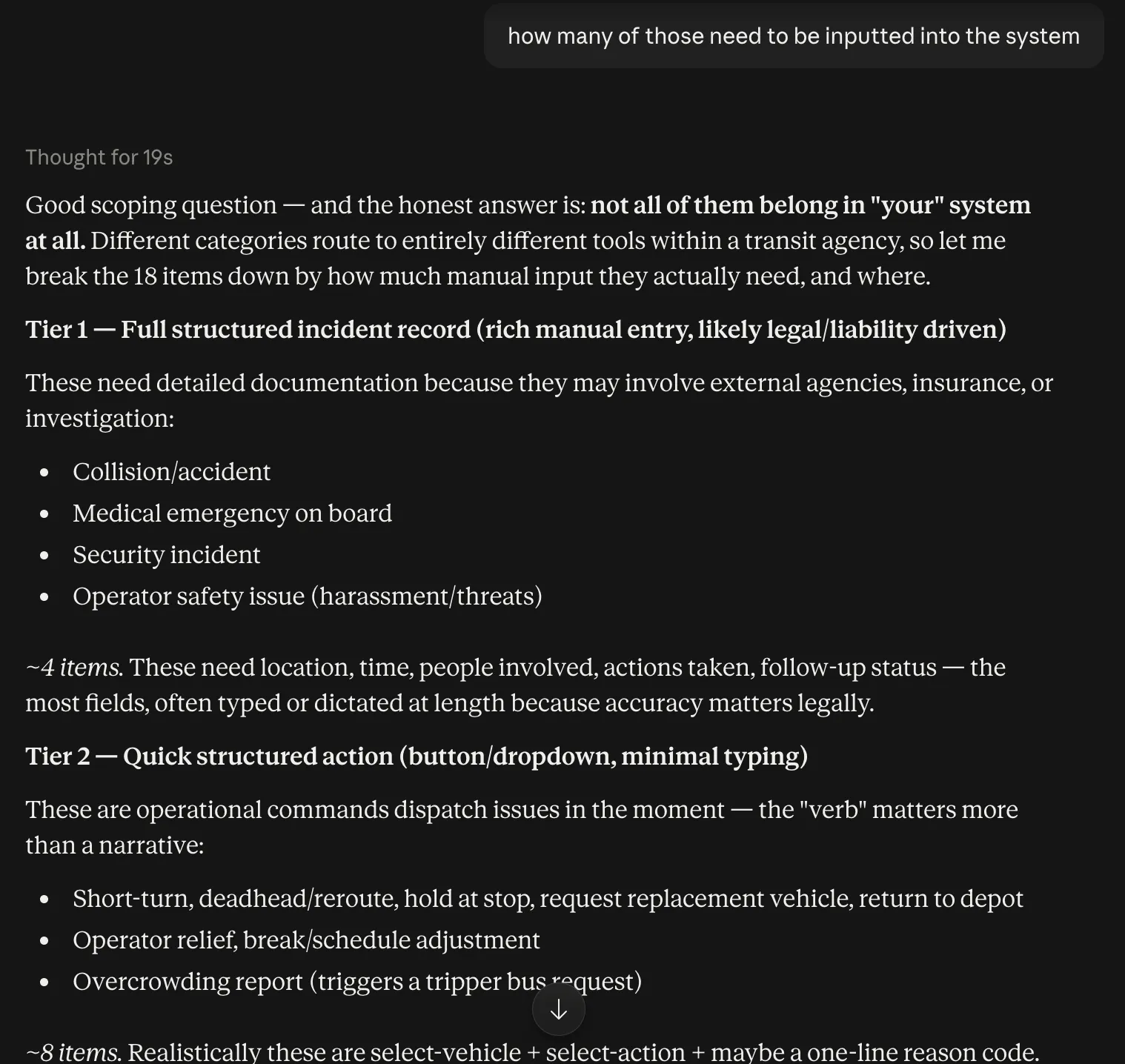
Based on all of that, I found it useful to split dispatch activity into two categories:
- Causes - the reason something is happening in the first place: a collision, a medical emergency, a security incident, an operator safety issue, a mechanical failure, or a road obstruction/traffic condition.
- Actions - what dispatch actually does in response: short-turning a vehicle (turning it back early to close a gap in service), deadheading or rerouting it, holding it at a stop, requesting a replacement vehicle, or pulling it back to the depot entirely.
Separating these two mattered for the data model, because a single incident, a collision, say, can trigger several different actions logged one after another over time, rather than one flat "this happened" record. That's why I ended up designing the incident and its actions as two connected but separate objects. Causes would dictate the forms they can fill out, as well as the actions they take. All of which influences the report that they're publishing.
It's also worth noting that (presumably) not every action dispatch takes needs to reach the public. A quick short-turn to fix minor bus bunching doesn't need a rider-facing alert the way a full route closure does, so this distinction directly shaped the tool's scope, since dispatch needs a clear way to flag which incidents are actually meant for Customer Information versus staying purely internal.
For references, I looked into public safety dispatch (911-style CAD software) and existing transit CAD/AVL products from vendors like Clever Devices, and TripSpark to get a sense of how this kind of software is usually structured. Since B2B companies rarely publish their UI to the public, barring demos and a screenshot here and there, what I could find was scant.
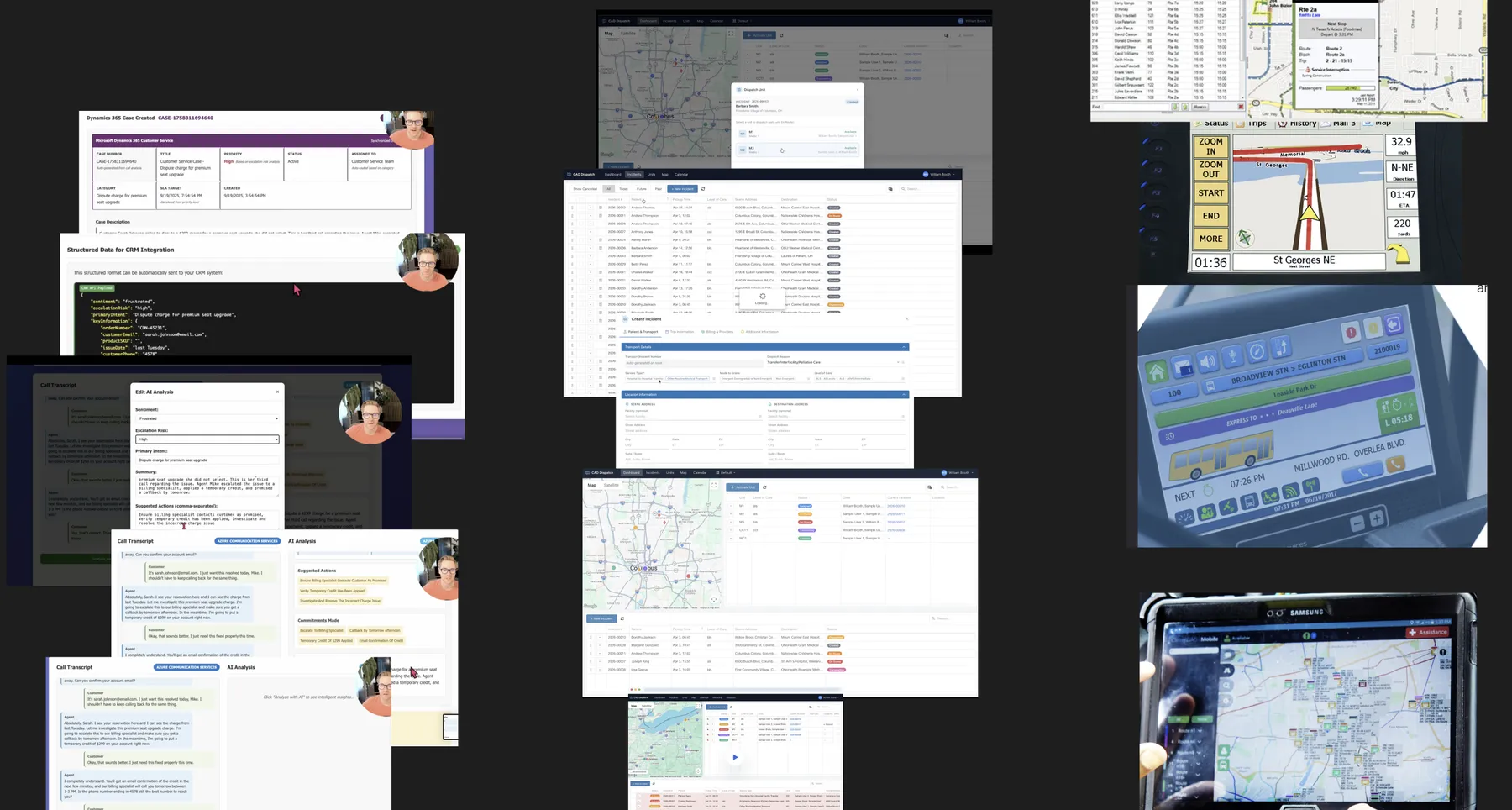
The Axure dispatch software demo in particular was interesting. They used AI to not only auto transcribe the call, but suggest how the form would be filled out based on the transcript- keyword being suggest, not autofill. I found this to be an excellent example of how AI can be built around low AI confidence and utilize it while not depending on it, which is extremely important when the tool and information is as vital as what the dispatch team does.
Assumptions
As I've mentioned, I do not have access to Translinks's internal systems, tools, or organizational structure beyond what I could glean from what I could find online. Because of this limitation (and because this is a self-started project done in my leisure time), I'm treating quite a few things as design assumptions rather than confirmed facts, since there is no way to validate any of it:
- The X Desk is a function within the Customer Information team, not a separate department, based on how they're referenced together in Transit's blog post rather than a confirmed org chart.
- The T-Comm-to-Customer-Information handoff is at least partly manual, inferred from initialed X posts and the observed publishing lag, not confirmed directly.
- The 10-15 minute delay is obseved by myself and reported from online forums.
- The delay is due to the T-Comm team writing, and checking the report manually.
Of course there are a lot of other assumptions, mostly to do with the data passed between the teams, but these are the ones that I would highlight. Normally, if this was a real project, of course the first thing I'd do is check the actual tool Translink uses, and interview dispatch and comms team members to not only validate my designs and assumptions, but gather the gaps in their process, but this proejct does not give me the opportunity to do user research.
With the problem narrowed to this specific gap, compressing the time and manual effort between a driver's radio call and a structured, publishable incident record, using AI-assisted suggestions along the way, I moved into mockups focused on the T-Comm side of the workflow.
Mockups
I like to move straight to high-fidelity mockups once I've got all the information I need. That's just the way that I work.
For this project, since I don't have anyone to bounce ideas off of (save Claude, but I was afraid of getting stuck in a direction I didn't want), I found it useful to write notes and do some (very minimal) paper mockups. This (and the references I gathered) helped me come up with the structure of my mockups.
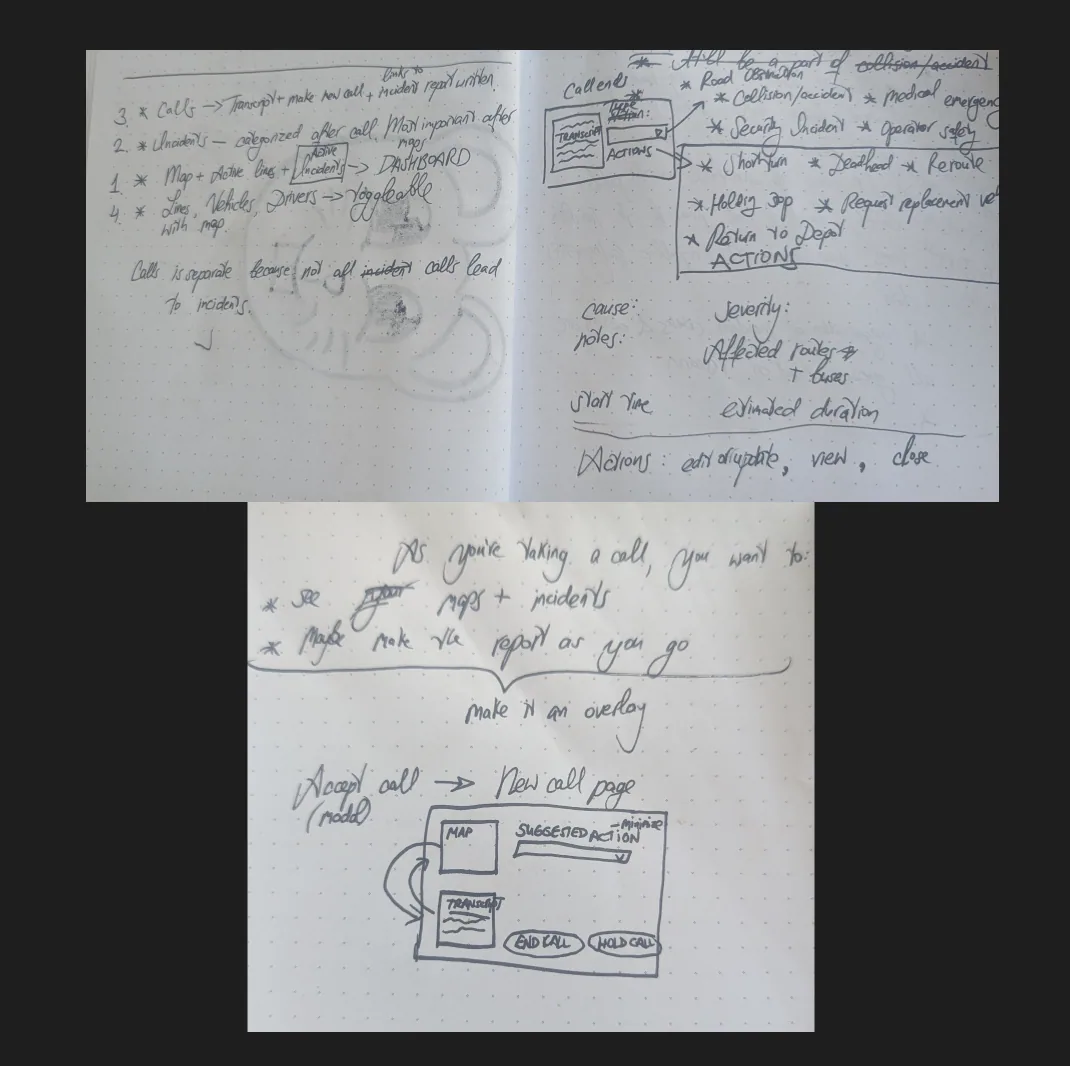
For my mockups I focused on showing the one flow, showing the process from driver to T-Comm, without delving into all the capabilities of the tool. For now, I've created just the driver to T-Comm/dispatch side, as the *how*of how the data is published to the GTFS for the Customer information team is the most vital part of this project, but I plan to add the dispatch to Customer Information side as well to show how the handoff is completed.
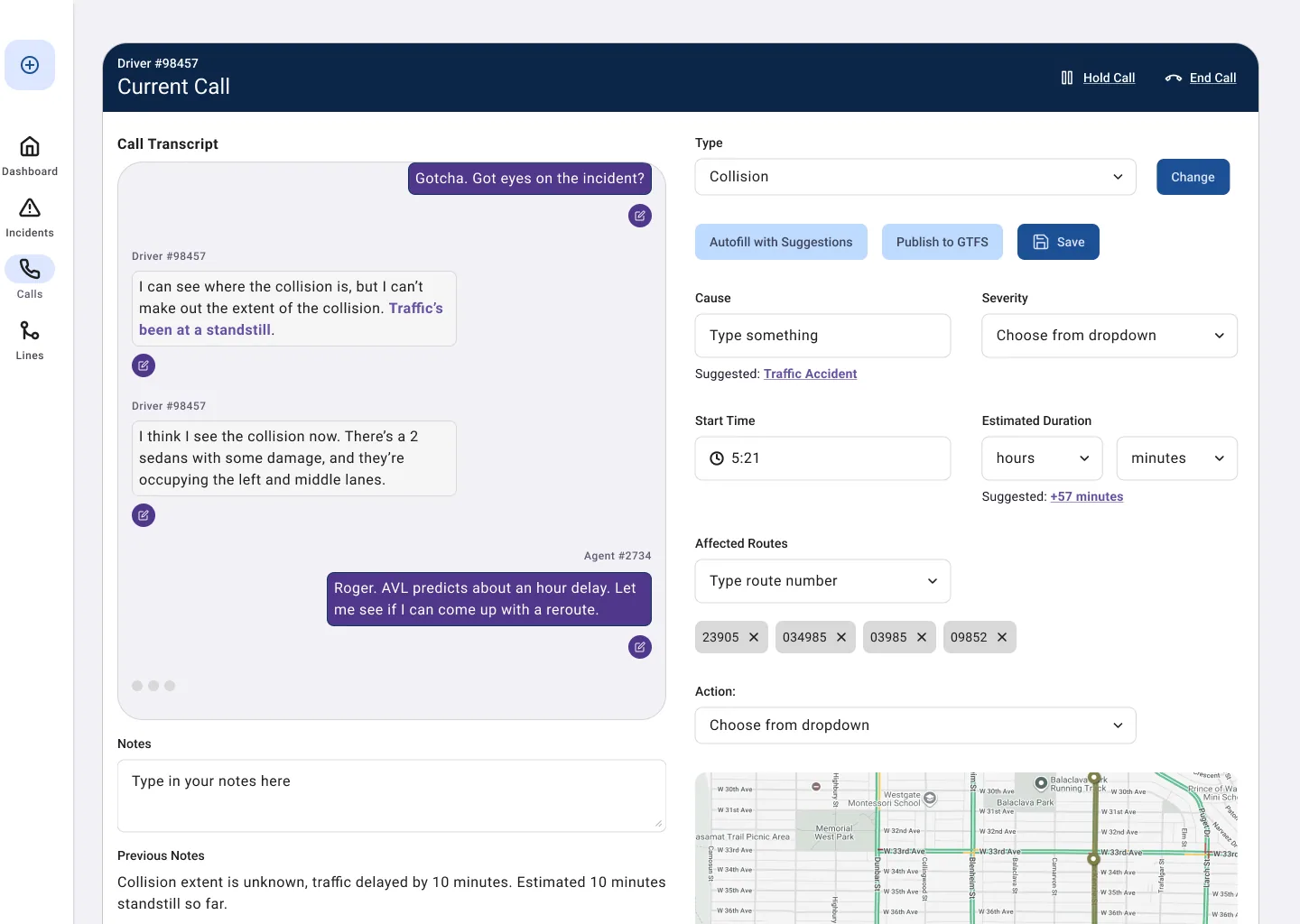
My focus was on creating an easy-to-use interface that utilizes AI in the process with a light hand- low confidence as to allow the T-Comm agent all opportunity possible to edit and make changes.
The mockup starts with a call incoming to T-Comm agent from a driver on their home screen:
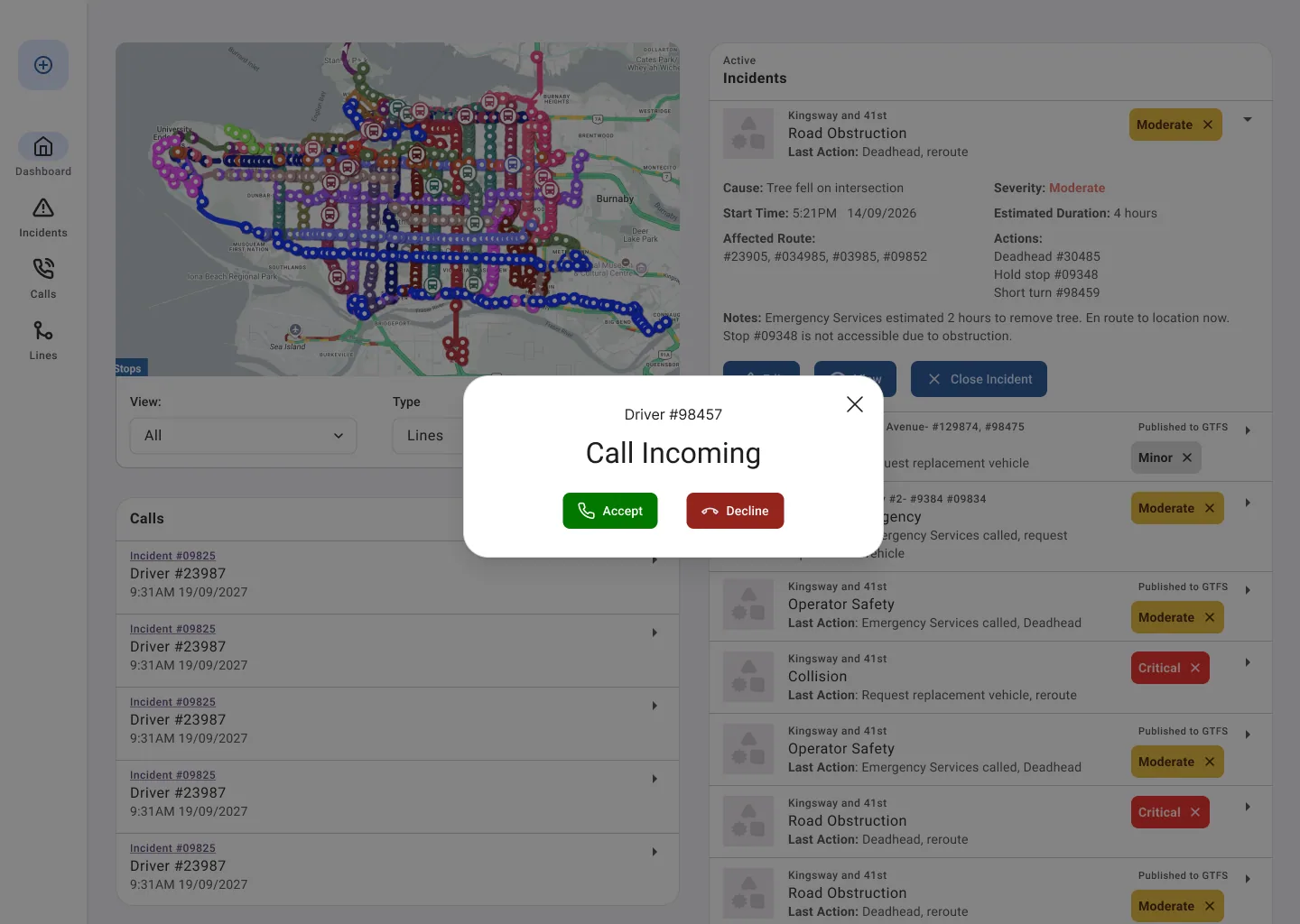
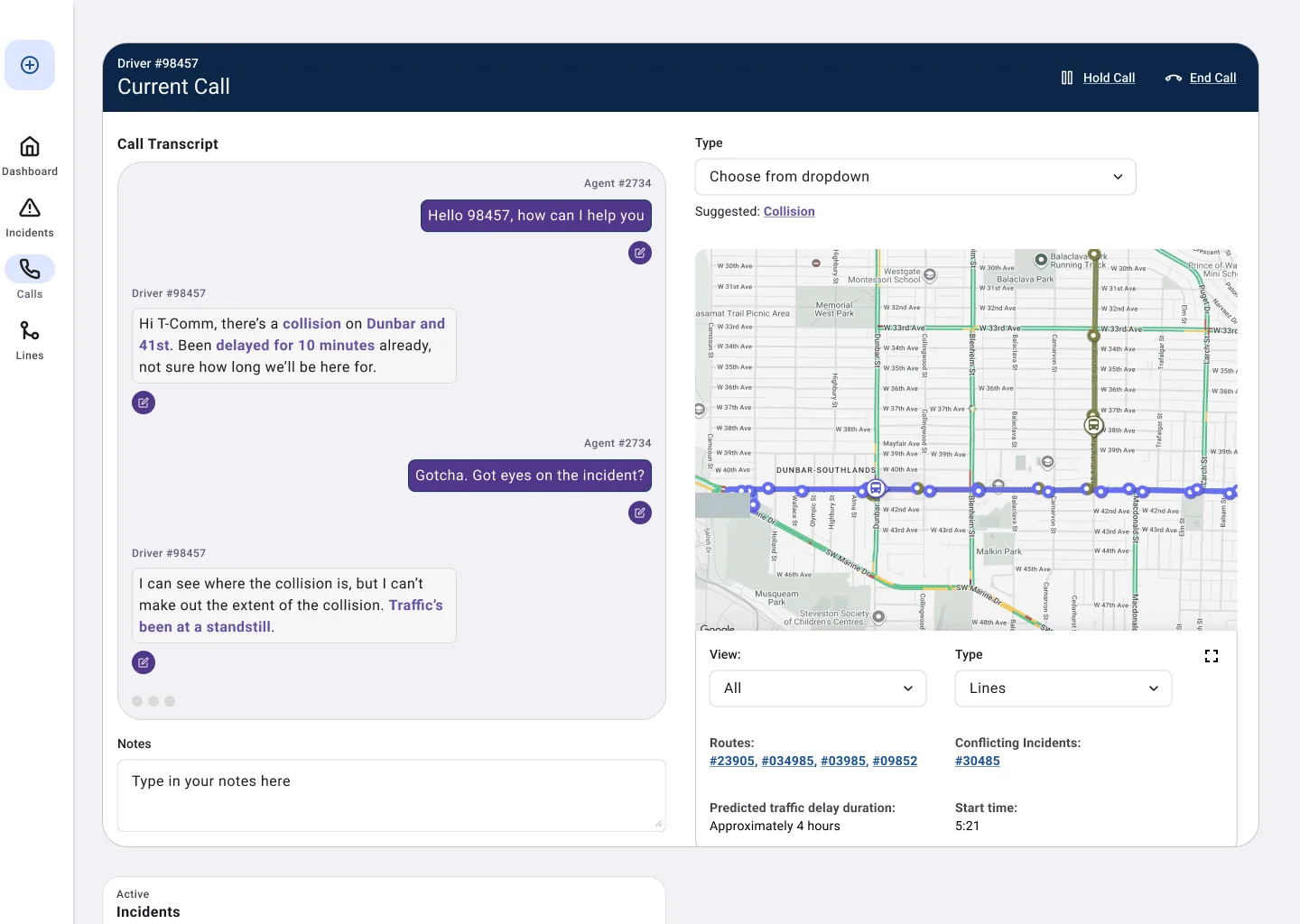
Then transitioning to the current call with auto-transcription and the agent being able to utilize auto-suggestion to choose the type of incident (and still reference the GTFS provided map that also utilizes AI suggestion to help in decision-making):
To filling out the form, which isn't auto-populated, but the auto-suggestions are easy to access.
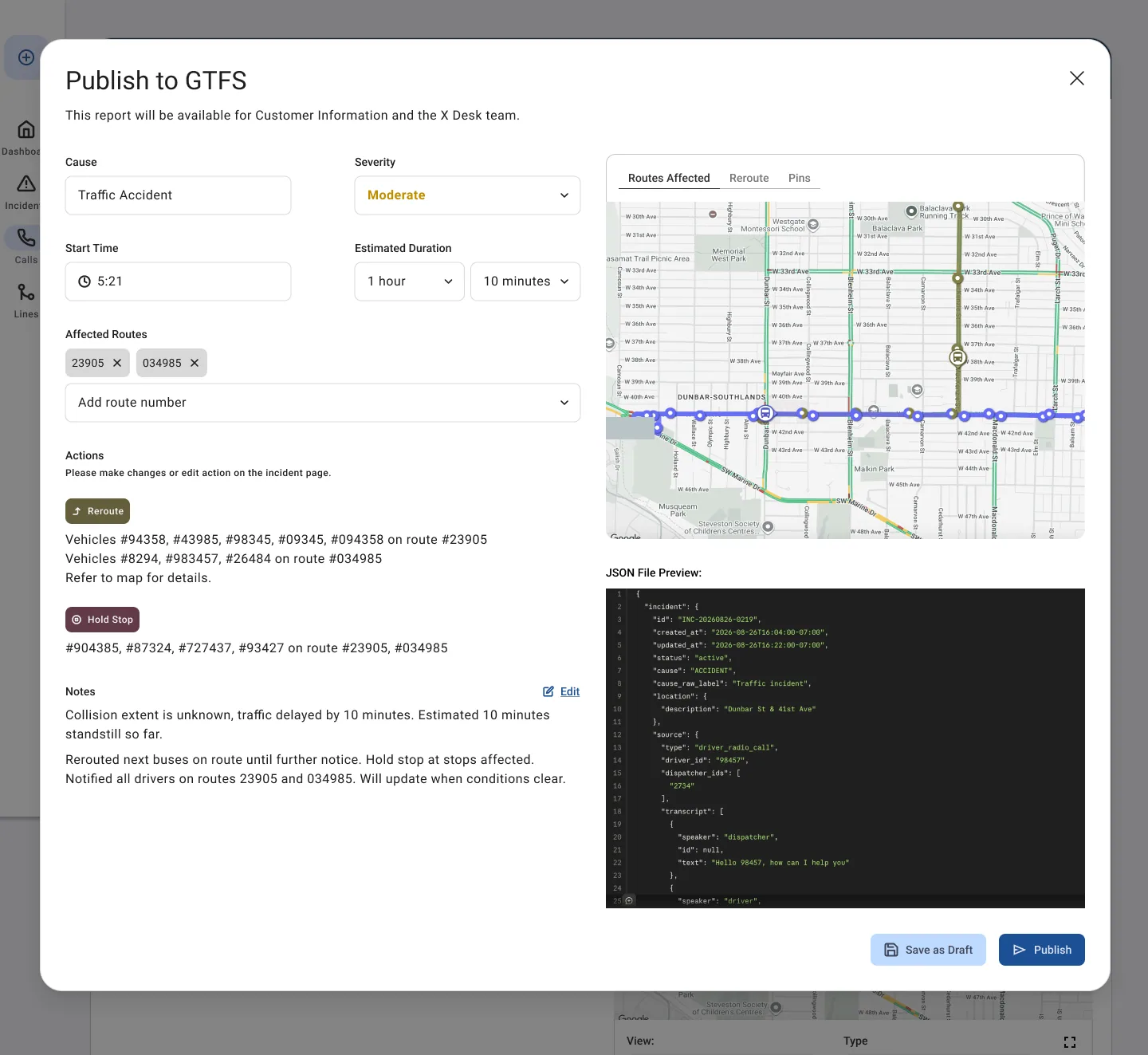
And then publishing the information to the GTFS/the Customer Information team. Mostly editable except for the actions. I also added a preview of the JSON form the data would take for maximum transparency.
Here is a link to the mockup in presentation form:
Conclusions
This was also my first time working directly with real operational data rather than hearing about it secondhand. At Staples, my understanding of the ATC tool's data came from the developers on that team, they'd already done the work of translating the system into something I could design against. Here, there was no one to ask, so I had to go pull the data myself which gave me a real appreciation for how much invisible work goes into making raw, live data usable at all.
It was great taking a peak into how AI is utilized in some dispatch software- confidently offered, easily overridden, never assumed correct. It shaped how I designed the T-Comm mockups. The moment a suggestion becomes an autofill nobody double checks, you've built something riskier than the manual process it replaced. I'd rather ship something a little slower that a dispatcher trusts completely than something faster they have to second guess.
If I were taking this further, the obvious next step is the one I couldn't do here: actually sit down with T-Comm and Customer Information staff. I found interviewing the ATC internal users so helpful in that project. So much of this project was based on assumptions, so building it off of the actual system they use and with input from actual users would be ideal and yield the best result. As it is, what I've built is just a hypothesis.
Furthermore, the more that I think about it, the more I would actually want to work on the small delays. Usually Translink publishes (by my observations) larger traffic delays, road closures and big incidents, but what about the smaller delays or just the one-off event once in a while when a bus doesn't show up at all? Or bus bunching? The GTFS does have real-time location data on all buses (I don't think the Skytrain does, as far as I'm aware) so it would be possible to provide more real-time data and automatically flag smaller incidents to transit riders. It is the small delays, added up over time that frustrate transit riders after all.
Overall I'm so glad I did this project. I learned a lot and got to spend time doing what I love doing- research, problem-solving, and simplifying and disemminating information.